AI image generators have made remarkable progress. Tools like Midjourney, DALL-E, Stable Diffusion, and newer "nano-banana" style models can produce photorealistic images that fool most people at first glance. But despite the advances, AI-generated images still leave telltale signs. If you know how to tell if a photo is AI, you can usually spot one in under a minute.
This guide walks through the practical ways to detect AI images by eye, the technical checks that back them up, and the free tools that confirm your hunch. Whether you're a journalist verifying a source, a buyer checking a listing, or just a curious scroller, these techniques will help you separate the real from the generated.
Key Takeaways
- Hands, text, and ears are the fastest tells. Generators still botch fingers, signage, and small repeated details.
- No single clue is proof. Stack several signals, visual, technical, and contextual, before you conclude.
- Free tools confirm your read. A reverse image search plus an AI image detector turns a hunch into evidence.
- Context is decisive. Where the image came from and why it was posted matters as much as the pixels.
Look at the Hands and Fingers
Hands are still the single most reliable giveaway. While generators have moved past the nightmarish six-fingered hands of early models, subtle issues persist. Look for fingers that merge together, nails that appear warped or inconsistent between hands, and joints that bend at unnatural angles. If someone is gripping an object, check whether the grip looks physically plausible. When in doubt, count the fingers.
Examine Text and Signage
AI models struggle with text, which makes signage one of the quickest ways to detect an AI image. Any words on signs, clothing, books, or screens are worth scrutinizing. Common giveaways include letters that morph into nonsensical shapes, inconsistent fonts within a single sign, and text that almost looks like real words but dissolves into gibberish on closer inspection. Perfectly rendered scenery with garbled text on a storefront? Almost certainly generated.
Study the Background Details
Generators focus rendering quality on the main subject and often neglect the background. Look for architecture that defies physics: staircases leading nowhere, windows at impossible angles, or buildings that break perspective. In crowd scenes, background figures may have melted or distorted features. Trees and foliage sometimes repeat in unnatural patterns. The subject can look flawless while the edges of the frame fall apart.
Check Skin Texture and Facial Features
AI-generated portraits often have an uncanny smoothness, almost like a heavy filter. Real skin has pores, fine lines, and subtle imperfections that AI tends to gloss over. Pay special attention to:
- Ears: Asymmetry is normal in real photos, but AI ears may have bizarre internal structures or be entirely different shapes from each other
- Teeth: Look for teeth that blur together, uneven sizing, or an impossible number of visible teeth
- Hair boundaries: Where hair meets the forehead or neck, AI often creates an unnaturally sharp or blurred transition
- Eyes: Reflections in each eye that don't match, or irises with inconsistent patterns, are a strong signal
Analyze Lighting and Shadows
Consistent lighting is hard for AI to maintain across a whole scene. Check whether shadows fall in the same direction for every object. A person might be lit from the left while the background suggests light from above. Reflections on glasses, water, or metal should agree with the light source. Mismatched reflections are one of the harder-to-fake tells, so they're worth the extra look.
Use Technical Methods to Detect AI Images
Beyond visual inspection, several technical checks help verify whether a photo is AI-generated:
- EXIF metadata: Real photographs usually carry camera info, GPS data, and timestamps. AI images typically have none, though metadata can also be stripped from real photos during upload, so treat absence as a hint, not proof.
- C2PA Content Credentials: An emerging provenance standard backed by major tech companies that embeds origin data into the file. Check for Content Credentials on supporting platforms.
- Reverse image search: AI-generated images usually have no prior history online, while real news or stock photos leave a traceable trail.
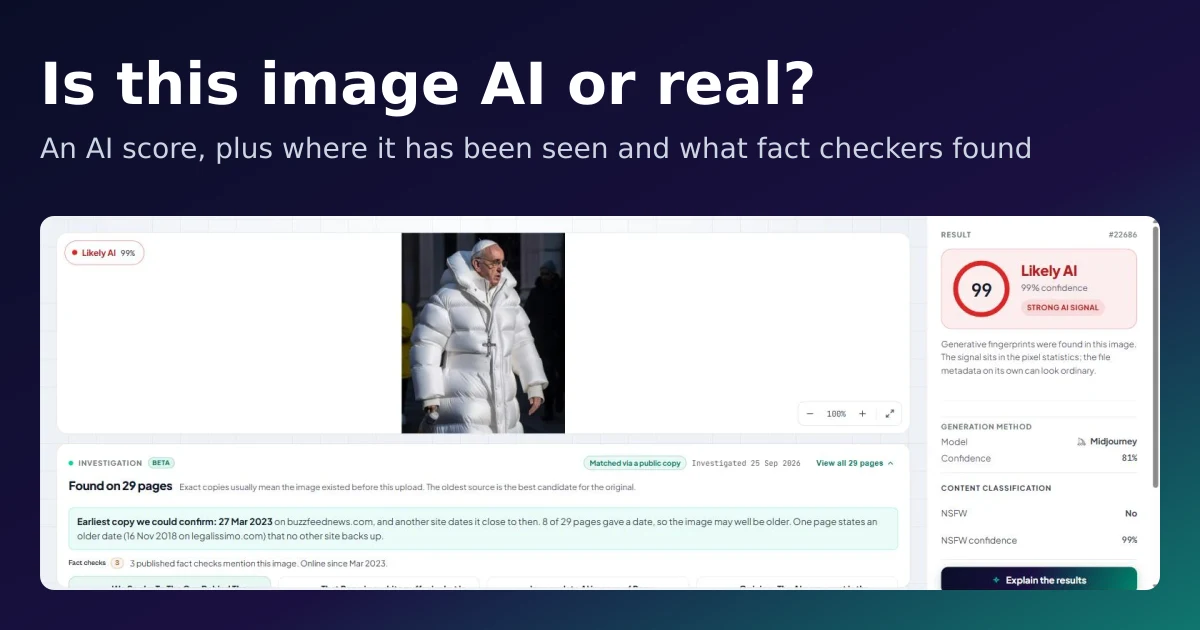
- AI image detection tools: Dedicated detectors analyze pixel patterns and statistical signatures. Run the file through our free AI image detector for a fast probability score.
Context Matters
Finally, weigh the context. Is the image being shared during a breaking news event? Does it seem engineered to provoke an emotional reaction? Is the source credible? AI-generated images are frequently used in misinformation campaigns targeting journalism and eroding public trust in media. Healthy skepticism plus the checks above will serve you well.
This guide focuses on photos. The tells differ a little for illustrations and paintings, so if you're checking creative work, see our companion guide on how to spot AI art, and for a beginner-friendly side-by-side, AI vs real images: a visual guide. For detection across every medium, text, video, and audio included, start with our overview on how to detect AI-generated content.
Frequently Asked Questions
How can you tell if a photo is AI-generated?
Check the hands, any text or signage, ears, and eye reflections first, these are where generators slip. Then confirm with a reverse image search and an AI image detector. No single clue is conclusive, so look for several pointing the same way.
How do I detect AI images for free?
Use a free AI image detector like the one on this site: upload the image and you'll get an AI-probability score in seconds, no account needed. Pair it with a reverse image search for the strongest free check.
Can AI image detectors be wrong?
Yes. Detectors return a probability, not a verdict, and accuracy drops on heavily edited or compressed images. Treat the score as one piece of evidence alongside the visual and contextual checks.
Do AI-generated images have metadata?
Usually little or none. Real cameras embed EXIF data (model, settings, sometimes GPS), while AI images typically lack it. But metadata is easily stripped from genuine photos too, so its absence is a hint rather than proof.
As AI generators improve, so do the methods for catching their output. The key is a habit: look critically at images instead of accepting them at face value, especially when something important is at stake.