
AI Detection
How to Tell If a Photo Has Been Edited With AI
AI edits to real photos can be harder to catch than fully AI images. Check the edit label, look for telltale flaws, and find the original to compare.
On this page
- Can You Tell If a Photo Has Been Edited by Looking at It?
- What's the Difference Between an AI-Edited and an AI-Generated Photo?
- How to Check a Photo's Edit Label on Your Phone
- Why a Missing AI Label Doesn't Mean the Photo Is Untouched
- Visual Signs a Photo Was Edited With AI
- How to Find the Original Version of a Photo
- How to Check If a Photo Is Edited Before You Share It

Can you tell if a photo has been edited with AI? Sometimes, and the most reliable way isn't staring at the pixels. Check the edit label your phone or app saved with the photo, look for a few telltale flaws where something was removed or added, and above all try to find the original picture to compare. An AI edit to a real photo can be harder to catch than a fully AI-generated image, because most of what you're looking at really happened and the usual giveaways may not be there.
Phones now make these edits a one-tap job. Apple says its Clean Up tool lets you "remove distracting objects in the background of a photo", and Google Photos has Magic Eraser and Magic Editor. Most of these edits are harmless: a stranger wiped from a holiday snap. But the same tools can quietly change who was standing next to whom, and that's when knowing how to check matters.
Key Takeaways
- In a 2017 study, people sorted original and edited photos correctly only 62% of the time, against 50% for pure guessing.
- Google Photos, Apple Photos and Samsung Galaxy phones can mark AI edits.
- No label doesn't mean no edit, because social platforms and chat apps often strip the hidden file details that carry it.
- Finding the original photo is the strongest check. Fact checkers caught an AI-edited political photo in 2026 by comparing it with the original.
Can You Tell If a Photo Has Been Edited by Looking at It?
Not reliably. In 2017, a study in the journal Cognitive Research: Principles and Implications asked Can people identify original and manipulated photos of real-world scenes? The authors' conclusion: "Subjects demonstrated a limited ability to detect original and manipulated images."
In their second experiment, with more than 600 people taking part online, "Subjects correctly classified 62% of the photos as being original or manipulated", where guessing would score 50%. And spotting that something was off wasn't the same as knowing what. The authors found that "even when subjects correctly detected manipulated images, they were often unable to locate the manipulation."
Those edits were made the old-fashioned way, years before one-tap AI erasers. Adding and removing objects was one of the edit types the study tested, and today's AI erasers do exactly that in one tap. So the checks below lean on information around the photo, not just on your eyes.
What's the Difference Between an AI-Edited and an AI-Generated Photo?
An AI-generated image is made from scratch by an AI model. An AI-edited photo started as a real camera shot, and then AI changed part of it. The industry labels that Google Photos uses to mark AI edits keep them in two separate categories: "Created using Generative AI" and "Edited using Generative AI". The second covers "Augmentation, correction or enhancement using a Generative AI model", such as filling in the gap left by a removed person.
This changes what you should look for. The usual advice for spotting AI images (odd hands, waxy skin, garbled backgrounds) is about fully generated pictures. On an AI-edited photo, most of the picture is often real. The faces, the light and the camera grain may all have come from an actual camera, with only one patch new. For fully generated images, our visual guide to AI vs real images covers those clues.
How to Check a Photo's Edit Label on Your Phone
If the photo is on your own phone, or someone sent you the original file, start here. Several phone makers now record AI edits inside the photo file.
Google Photos
Google's Google Photos help page gives the steps: open the photo in the Google Photos app, tap More, then About, and scroll to "How this was made." You may see one of these labels:
- "Edited with AI tools" for photos changed with generative AI, such as Magic Eraser.
- "May have been edited by AI tools." when another app recorded the edit but didn't say whether AI was used.
- "Edited with non-AI tools." for ordinary edits like cropping and rotating.
On some photos you'll find an "AI info" section instead; the same page says that happens with photos from devices or apps that don't support Content Credentials (explained below). It also says plainly that "Content Credentials aren't available for every photo or video", and that they don't tell you whether a photo is real or fake.
Apple Photos on iPhone
When 9to5Mac tested Clean Up in August 2024, on a test version of iOS 18.1, it found that the Photos app shows a photo has been 'Modified with Clean Up'. The label is also saved in the photo's hidden file details as 'Apple Photos Clean Up'. How you received the photo matters: 9to5Mac found that sending it by AirDrop or iMessage kept the label, "but sending it via apps like WhatsApp and Telegram won't."
Samsung Galaxy
Samsung's support page says "Images edited with AI will include a watermark to show that they may not be depicting something that exists in the real world." Look for that watermark on the photo. Like any label, not finding it doesn't prove the photo is untouched.
The "CR" pin: Content Credentials
Some apps, cameras and websites attach Content Credentials, built on an international technical standard. Google, for example, says its Pixel 10 phones are "the first to have Content Credentials built in across every photo created by Pixel Camera." The Content Authenticity Initiative describes them as "the verifiable metadata that the CAI's tools help implementers generate, read, and display". Where a site supports them, you'll see a small "CR" pin on the image. Move your pointer over it to reveal what its makers call a 'digital nutrition label' or list of ingredients. If you have the file, you can also upload it to the Verify website run by the initiative.
Why a Missing AI Label Doesn't Mean the Photo Is Untouched
Many edited photos you see online reach you with this information already gone. In January 2026, Adobe Research's John Collomosse wrote on the Content Authenticity Initiative's blog that "it is still common for social media and content platforms to remove metadata". Forwarding a photo through a chat app can wipe the label too, as the Clean Up example above shows.
Platform labels can mislead in both directions. In June 2024, TechCrunch reported that "Meta seems to be applying the 'Made with AI' label when photographers use tools such as Adobe's Generative AI Fill" to remove objects, so real photos with a small cleanup were tagged as AI. Meta then changed its approach. It renamed the label "AI info", and in September 2024 said that for content "only modified or edited by AI tools", it was moving that label to the post's menu. So on Facebook or Instagram, a photo that was only edited with AI may show no label up front. Open the post's menu to check.
A label helps when it's there. When it isn't, you've learned nothing either way.
Visual Signs a Photo Was Edited With AI
Eyes alone aren't enough, but some flaws are worth looking for, especially around the spot where you suspect a change. In a 2024 Washington Post field guide, Lancaster University researcher Sophie Nightingale pointed to "blurring around the edges of objects that might suggest they've been added later."
- Soft or smeared edges around a person or object that look less sharp than the rest of the scene.
- Broken patterns. The same guide says fine details are hard to edit cleanly, and that this "is often easy to spot when regular, repeating patterns are disrupted or distorted": tiles, bricks, railings or fences that suddenly bend, blur or repeat oddly where something was removed.
- Nonsense text on signs, posters or leaflets near the edit. AAP FactCheck's guide notes that "Letters and numbers in AI images are often garbled and unreadable."
Here's how quiet a removal can be. Compare the two photos below.
 Original
 Edited
Compared directly, the missing tower is easy to see once you know where to look. Seen alone, the edited photo looks completely normal: clean sky, consistent light, nothing smeared. So the next check is the one to rely on.
How to Find the Original Version of a Photo
The UK fact checker Full Fact's guide to misleading images says: "To be absolutely certain it's not all it appears to be, you can try and find the original image yourself." Search for the photo online, check the account of the person who took it, and look for news coverage. An earlier, unedited copy lets you compare the two yourself.
In April 2026, Full Fact checked a photo of Reform UK MP Sarah Pochin out campaigning. Its verdict: "This image has been edited to change the supporters standing with her in the original photo posted by Ms Pochin." Full Fact pointed to three things:
- The original existed. "Ms Pochin posted the original photograph showing her out campaigning with the local Reform UK Halton team".
- The text gave it away. "Nonsensical text on the leaflets in the edited version also suggest it was manipulated with AI."
- A hidden watermark. "The edited image contains a SynthID watermark, indicating it was changed using Google AI tools."
Only one of those, the garbled text, came from looking closely. The other two didn't depend on your eyesight at all.
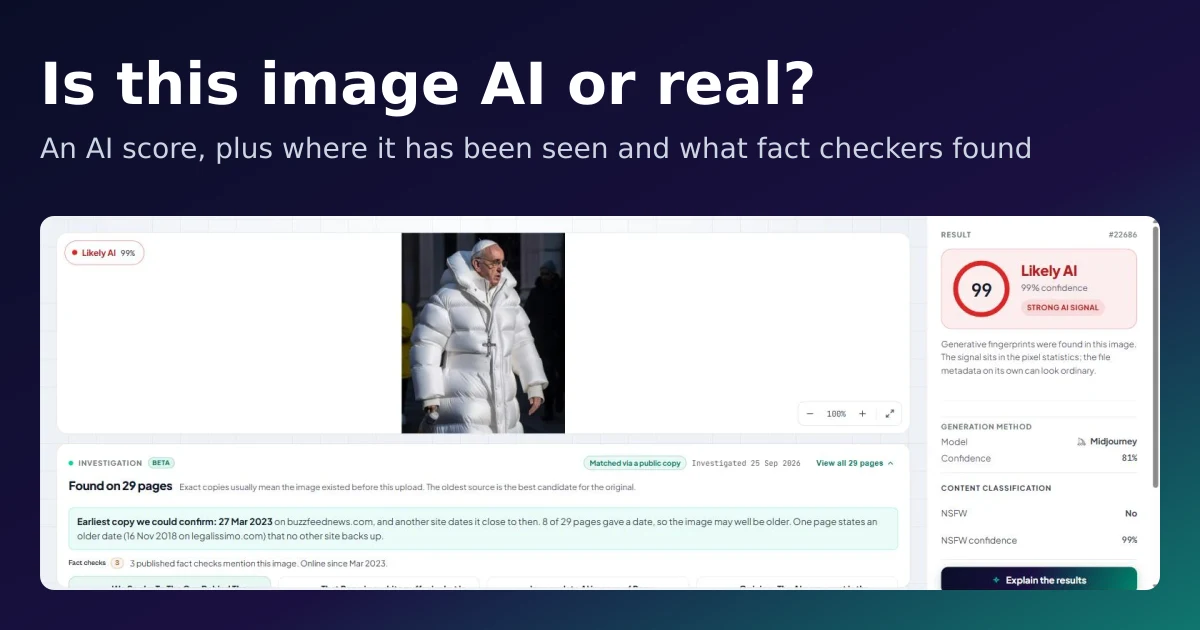
Investigate online in the IsItAI.com AI image detector can help with this step. It shows where else the image has appeared online, the earliest copy we could confirm, and any published fact checks, so you can compare the version in front of you with earlier ones. It's part of our paid plans. Our post Is This Image AI or Real? walks through how it works.
How to Check If a Photo Is Edited Before You Share It
- Check the label if you have the file: About in Google Photos, the photo info in Apple Photos, a watermark on Samsung, or a "CR" pin online.
- On Facebook or Instagram, open the post's menu to look for "AI info".
- Zoom in on the suspicious spot. Look for soft edges, bent patterns and nonsense text.
- Search for the original. Earlier copies, the photographer's own post, or a fact check.
- Run an AI check for a probability on fully generated images. A score is a clue, not proof.
- If you still can't tell, say so. "I couldn't verify this" is an honest answer.
For video and voice, which bring their own tricks, see our guide to detecting deepfake audio and video.
Check a photo yourself
Upload it to the detector. Investigate online shows where it has appeared before.
Frequently Asked Questions
Can you tell if a photo has been edited with AI?
Sometimes, but rarely by eye alone. In a 2017 study, people sorted original and edited photos correctly only 62% of the time. Check the photo's edit label, look for soft edges, bent patterns and garbled text, and try to find the original photo to compare.
How do I see if a photo was edited with AI in Google Photos?
Open the photo in the Google Photos app, tap More, then About, and scroll to "How this was made". Photos changed with tools like Magic Eraser can show "Edited with AI tools". Some photos show an "AI info" section instead, and not every photo has this information.
Does an iPhone show if a photo was edited with Clean Up?
It did in 9to5Mac's August 2024 test of an iOS 18.1 test version: Apple Photos showed 'Modified with Clean Up' and saved a matching label in the file details. The label survived AirDrop and iMessage, but not sending through WhatsApp or Telegram.
If a photo has no AI label, is it real?
Not necessarily. Social media and chat apps often strip the information that carries these labels, and Meta moved its "AI info" label for AI-edited photos into the post's menu. A missing label tells you nothing either way.
What is the difference between AI-edited and AI-generated?
An AI-generated image is created from scratch by an AI model. An AI-edited photo is a real photo where AI changed part of it, such as removing a person or filling in background. AI-edited photos can be harder to spot because much of the picture is real.
Sources
- Nightingale, Wade and Watson, Can people identify original and manipulated photos of real-world scenes?, Cognitive Research: Principles and Implications, 18 Jul 2017, retrieved 2026-10-13, pmc.ncbi.nlm.nih.gov
- IPTC, Digital Source Type vocabulary, retrieved 2026-10-13, cv.iptc.org
- Google Photos Help, How Google Photos helps you identify how photos and videos were made, retrieved 2026-10-13, support.google.com
- Apple Support, Remove distractions and imperfections from your photos on Mac, retrieved 2026-10-13, support.apple.com
and 14 more
- 9to5Mac, iOS 18.1 labels images edited with Clean Up, here's how to tell, 28 Aug 2024, retrieved 2026-10-13, 9to5mac.com
- Samsung Support, When saving an AI-edited photo, can others recognize it as AI-edited, and how can I verify AI edits?, updated 15 Jan 2024, retrieved 2026-10-13, samsung.com
- Google, More transparency for AI edits in Google Photos (John Fisher), 24 Oct 2024, retrieved 2026-10-13, blog.google
- Google, How Pixel and Android are bringing a new level of trust to your images with C2PA Content Credentials, 10 Sep 2025, retrieved 2026-10-13, blog.google
- Content Authenticity Initiative, How it works, retrieved 2026-10-13, contentauthenticity.org
- C2PA, Introducing Official Content Credentials Icon, 10 Oct 2023, retrieved 2026-10-13, c2pa.org
- John Collomosse, The three pillars of provenance that make up durable Content Credentials, Content Authenticity Initiative, 22 Jan 2026, retrieved 2026-10-13, contentauthenticity.org
- TechCrunch, Meta is tagging real photos as "Made with AI," say photographers, 21 Jun 2024, retrieved 2026-10-13, techcrunch.com
- Meta, Our Approach to Labeling AI-Generated Content and Manipulated Media (updates of 1 Jul and 12 Sep 2024), retrieved 2026-10-13, about.fb.com
- Chris Velazco and Monique Woo, Fake images are getting harder to spot. Here's a field guide, The Washington Post via Anchorage Daily News, 29 Jul 2024, retrieved 2026-10-13, adn.com
- AAP FactCheck, How to spot AI-based visual disinformation, 28 Jan 2024, retrieved 2026-10-13, aap.com.au
- Full Fact, How to spot misleading images online, updated 6 Apr 2023, retrieved 2026-10-13, fullfact.org
- Full Fact, Fake AI-edited image of Reform UK MP Sarah Pochin circulates online, 17 Apr 2026, retrieved 2026-10-13, fullfact.org
- Images: National Museum of Fine Arts (Manila, 2024), original and digitally altered versions, by PhiliptheNumber1, CC BY 4.0, via Wikimedia Commons
More from the blog
Was this image made by AI?
Upload any image and find out if it was made by AI. Your first 3 checks need no account.